
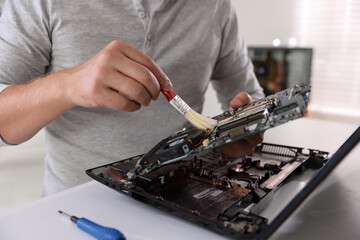
The motherboard is a critical component of your computer, and neglecting its maintenance can negatively impact performance. Dust and debris can accumulate over time, leading to overheating and potential hardware failures that disrupt your workflow. Also dust buildup and heat issues highlight the long-term benefits of computer maintenance beyond basic software updates.
By recognizing the importance of regular cleaning, you can proactively maintain your system’s efficiency and extend its lifespan.
Cleaning your motherboard is essential for optimal performance and longevity. Staying vigilant for signs of dust buildup and employing effective cleaning techniques can prevent overheating and costly repairs.
Clean your motherboard regularly to ensure your computer runs smoothly for years to come.
Why Motherboard Maintenance Matters
Your motherboard is the backbone of your computer, connecting all vital components. Proper maintenance ensures smooth operation, prevents overheating, and prolongs the lifespan of your entire system.
Regular care is not just a convenience; it’s a necessity for reliable performance.
- Essential for System Functionality: Your motherboard connects and communicates with critical components like the CPU, GPU, and RAM.
- Prevents Overheating: Dust accumulation can block airflow, leading to increased temperatures and hardware failures.
- Prolongs Component Lifespan: Maintenance reduces wear and tear, safeguarding your investment.
Benefits of Proper Motherboard Maintenance
Enhanced Efficiency
- Clean components allow for better heat dissipation, enabling the CPU and GPU to function optimally.
- A well-maintained motherboard improves system responsiveness and speed.
Cost Savings
- Reduces the risk of hardware failure, avoiding costly repairs or replacements.
- Extends the lifespan of your entire computer system.
Reliable Performance
- Ensures your computer runs smoothly for all tasks, from gaming to work.
- Minimizes the chances of unexpected shutdowns or crashes.
Taking the time to care for your motherboard may seem tedious, but the benefits far outweigh the effort. With regular maintenance, you’ll enjoy a reliable, efficient system that lasts longer and performs better.
Signs Your Motherboard Needs Cleaning
Your motherboard’s performance can deteriorate over time due to dust and debris buildup. Knowing the signs that indicate it’s time for a cleaning can prevent long-term damage and keep your system running smoothly.
Key Indicators of a Dirty Motherboard
1. Increased Heat Levels
- Hotter System Performance: Rising temperatures may suggest blocked airflow due to dust.
- Impact on Hardware: Excessive heat can cause throttling and damage to critical components.
2. System Instability
- Random Crashes: Dust buildup can disrupt connections, leading to unexpected shutdowns.
- Lagging Performance: Inconsistent operation may signal compromised motherboard efficiency.
3. Visible Dust Accumulation
- Thick Layers of Grime: Dust covering the motherboard is a clear sign that cleaning is overdue.
- Blocked Components: Dust can obstruct heatsinks, ports, and connectors, affecting functionality.
Other Warning Signs
Unusual Noises
- Fan Clattering or Rattling: Dust-laden fans may struggle, creating extra noise and reduced efficiency.
Sluggish Performance
- Slow Boot Times: Dust interfering with connections can lead to delayed system start-ups.
- Reduced Hardware Responsiveness: Performance lags could indicate compromised motherboard health.
Spotting these signs early and acting promptly will ensure your motherboard stays in top condition for years to come.
Effective Cleaning Techniques
Cleaning your motherboard regularly is essential for maintaining its performance and extending its lifespan.
By following these step-by-step techniques, you can safely and effectively remove dust and grime without damaging delicate components.
Step 1: Prepare Your Workspace
Unplug and Ground Yourself
- Disconnect your computer from the power source.
- Use an anti-static wrist strap or touch a grounded metal object to avoid static discharge.
Remove the Motherboard
- Carefully detach all cables and components.
- Place the motherboard on a clean, flat, and non-conductive surface.
Step 2: Remove Dust and Debris
Use Compressed Air
- Hold the can upright and keep it a few inches from the surface.
- Target key areas such as the CPU socket, RAM slots, and connectors.
- Avoid tilting the can to prevent propellant discharge.
Brush Away Residue
- For stubborn particles, use a soft, anti-static brush to gently loosen debris.
- Pay extra attention to heatsinks and fan areas prone to accumulation.
Step 3: Address Stubborn Grime
Isopropyl Alcohol Cleaning
- Use 90% or higher isopropyl alcohol for effective cleaning.
- Dampen a microfiber cloth lightly and wipe sticky or dirty spots gently.
- Avoid saturating the cloth to prevent liquid seepage into sensitive areas.
Corrosion or Residue Removal
- For corroded connectors, use a soft-bristled brush with isopropyl alcohol.
- Gently scrub the affected areas without applying excessive pressure.
Step 4: Reassemble with Care
Allow Thorough Drying
- Ensure the motherboard is completely dry before reinstalling it.
- Let it air dry for at least 30 minutes in a well-ventilated space.
Reconnect Components and Test
- Reassemble your computer, reconnecting all components carefully.
- Power on your system to confirm everything functions as expected.
Benefits of Regular Cleaning
- Improved Performance: Removes dust that can hinder airflow and heat dissipation.
- Longevity: Prevents damage caused by debris and corrosion.
- Cost Savings: Reduces the likelihood of repairs or replacements.
Incorporate these cleaning techniques into your maintenance routine to ensure your motherboard operates efficiently and lasts for years to come.
If your computer continues to experience power issues, unexpected shutdowns, or motherboard problems despite regular cleaning, contact CSEKC at 913-980-7665 for professional motherboard diagnostics and repair in Kansas City. Our technicians provide component-level troubleshooting to identify and repair hardware failures.